Authentication
The backend operates per-se in a stateless manner. This means that no request depends on any other data outside, the request itself, or any previous requests. The server does not store any vital information in the server-side session. This means that every REST API request must contain authentication information.
The Pricefx REST API supports the following types of authentication:
- Basic authentication – do not use in production environments for every request (can be used to obtain the JWT token)
- JWT token authentication
- External JWT token authentication
-
OAuth 2.0 authentication
Information
The name "API Protocol – Version 2" suggests that this version is "newer" or "better", it is not. It is simply different. So it is absolutely fine to use API Protocol – Version 1. The default user interface, the Excel Client, and many other systems rely on and use API Protocol – Version 1 authentication.
Basic Authentication
As the user's credentials are being sent in every HTTP request we do NOT recommend using this authentication method for production environments.
Note
The basic authentication leads to an extra 500 ms request execution time as the password verification is intentionally slow to mitigate brute-force password guess attacks. So in case you plan to run high volume API operations, please use the JWT token as the authentication mechanism.
How to Authenticate Using HTTP Basic Authentication
Each request must contain an Authorization header, with a Base64 encoded value.
Authorization: Basic <Base64-encoded user data>Base64-encoded user data must be in the following format:
<partition name>/<user name>:<password>
Basic Auth Example
Authorization of a dummy user on the mypartition partition:
- Partition name: mypartition
- User name: john.doe
- Password: pass_123
Data to encode: mypartition/john.doe:pass_123
Base64-encoded user data: bXlwYXJ0aXRpb24vam9obi5kb2U6cGFzc18xMjM=
The authorization header that will be added to the request to get a response should then be as follows:
Authorization: Basic bXlwYXJ0aXRpb24vam9obi5kb2U6cGFzc18xMjM=Setting Up Basic Authentication in Postman
Follow these steps to use Basic authentication in Postman:
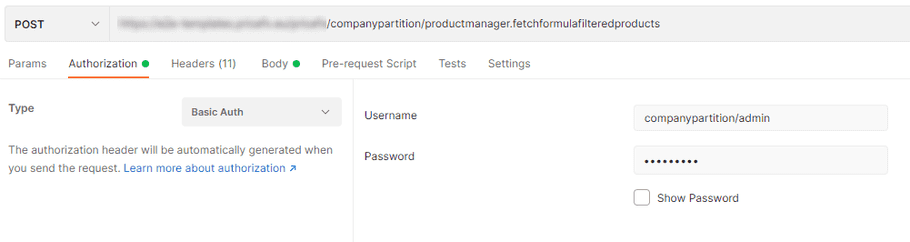
- On the Authorization tab, select Basic Auth from the Type drop-down menu.
-
As
Username
, enter
<partitionName>/<yourUserName>. -
Enter your password for the partition.
Information
When using Postman, you don't need to encode your credentials as it is done automatically by Postman.
JWT Token Authentication
Use the JWT (JSON Web Token) as a preferred method of authentication. The token can be either sent as an HTTP header or as a cookie and has an encoded expiration timestamp. JWT tokens can be invalidated on a per-user basis by changing the user's password.
Please note
JWT token is automatically issued (as a cookie) when an API call with Basic authentication (user/pwd) is called – it is highly recommended to use the JWT for subsequent calls (and not user/pwd on every API call).
Once the JWT nears its expiry, the server automatically re-issues (again as an updated cookie) a new JWT token value. The client should then replace the token on their end. Cookie-aware clients (such as browsers) do that automatically.
Information
You can use the /accountmanager.getjsonwebtoken endpoint to get a non-expiring JSON Web Token – used for integration purposes.
How To Authenticate Using JWT Token
- Make an API call to the desired partition using Basic authentication . You can use /login/extended endpoint for this purpose.
-
You will receive the
X-PriceFx-jwttoken as a cookie. -
Use the
X-PriceFx-jwttoken for every subsequent request.
Setting Up JWT Authentication in Postman
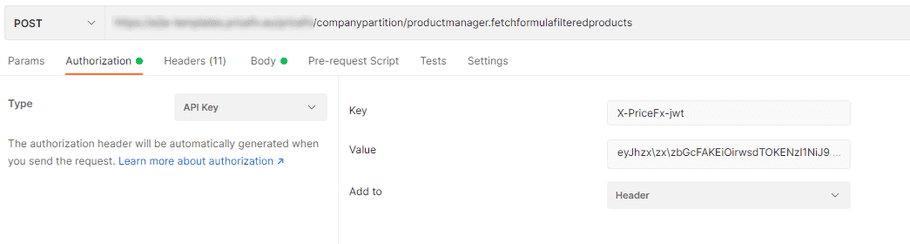
- On the Authorization tab, select API Key from the Type drop-down menu.
-
As
Key
, enter your
X-PriceFx-jwttoken. -
Select the
Header
option in the
Add to
field.
External JWT Token Authentication
You can use a 3rd-party JSON Web Token for user authentication (can be used, for example, with Salesforce). Similarly to SAML, there is no need for hard-coded per-user credentials, instead a system-to-system trust relation is established using signed tokens.
Configuring the Trust Relationship
The configuration is stored in a per-partition configuration in Advanced Configuration Option (Administration > Configuration > System Configuration > Advanced Configuration Options) with the name externalJWTConfiguration and the following value:
{
  entries : {
    <externalSystemName> : {
      publicKey : <public key used by external system for signing in PEM format>
      permissions: <null or JSON list of Strings with permissions names>
    }
  }
}
Where:
externalSystemName is a JSON compatible name of the external system (i.e., only [A-Z a-z 0-9], no whitespaces, etc). This name is also used in the bearer auth header (see below). You can add as many external systems as you like, each with an individual name.
publicKey is a string representation of the public key in the PEM format (see below for an example). Pricefx only supports RSA keys.
permissions can be null (or omitted) – in that case, the trust does not further restrict permissions (= allow all). If there is a list defined, then any API call using that token/config will only be allowed if the endpoint’s permission requirement matches the permissions listed here.
Important
This permissions list is just an additional filter. I.e., the authenticated user as such needs to have the required permission to begin with. This setting will not add or allow anything the user could do using regular authentication. It can be used to restrict the trust relation to specific API calls only.
Example of a public key:
-----BEGIN PUBLIC KEY-----
MIIBIjANBgkqhkiG9w0BAQEFAAOCAQ8AMIIBCgKCAQEA0E9Zp0JNbDaOMqhZd1C+
/FdBTCjza0qXcjTYCbDUeY89qPpwN19QovmehCVGBSFzLOkltx0YmlCkaKLtzqfS
...
... (edited for security reasons)
...
fXr4+6SBmEOVa7RSzoXr3whpdMdKsIvnDCCmT++aJvHBw63ZKGKb8+ZTAXv0z3sm
LDRyhifUmEoJPGWHV6/oxZQiVRapEFe7SiVTbr2IW7OfrdE3DVrioJmATEKgVr5i
zwIDAQAB
-----END PUBLIC KEY-----
Authenticating
Once the trust relationship is configured, you can use it to authenticate API calls. This is done by sending the signed (by the external system possessing the private key part) and compacted JWT token returned by the server in the standard Authorization HTTP header in the following form:
Authorization: BEARER <externalSystemName>;<signed JWT token>The JWT token follows standard RFC rules in terms of structure, signature, etc. Please note that only the RS256 signature method is supported.
The content of the token consists of three parts with a certain structure:
Header:
{
 "alg": "RS256"
}-
algidentifies the algorithm used to generate the signature. It must always be set to RS256 – other algorithms are not supported.
Payload:
{
 "sub": "root",
 "iss": "AllowAll",
 "aud": "integration-test",
 "partition": "system"
}-
subis the standard subject field of the JWT token. It must contain the loginName of the user. -
issis the standard issuer field of the JWT token. It must contain the external system name value (i.e., the same name as in the trust config and in the HTTP header). -
audis the standard audience field of the JWT token. It must contain the Pricefx cluster name. -
partitionmust be set to the partition of the target & user.
Signature:
The signature part is a combination of the encoded header, the encoded payload, a secret, the algorithm specified in the header – all that signed.
API Protocol – Version 1 with Two-factor Authentication
On a per-user basis TFA can be enabled. If such a user should be used for a backend call (and no session cookie is present), an additional HTTP header with the current TFA token needs to be added. The TFA header looks like this:
PriceFx-TFA: {cleartext TFA Token}The TFA token is usually a 6 digit number.
OAuth 2.0 Authentication
Pricefx supports OAuth 2.0 for standards-based delegated access to the REST API. The implementation follows the Authorization Code Grant flow as defined in RFC 6749, section 4.1 and supports PKCE as defined in RFC 7636. Only the authorization code flow is implemented; implicit flow and dynamic client registration are not supported.
OAuth 2.0 is typically used when you want to:
- Allow a third‑party application to call the Pricefx API on behalf of a user, or
- Use a standards-compliant flow with authorization and token endpoints instead of custom authentication mechanisms.
Client Registration
Before a client can use OAuth 2.0, it must be registered in the application property oauthConfiguration. Multiple clients can be registered.
Example configuration:
{
  "knownClients": {
    "client1_full_profile": {
      "redirect_uri": "http://localhost:8000/callback",
      "samlProfile": "PFXAZURE",
      "token_expiry": 7200,
      "client_secret": "secrethere",
      "client_description": "Some reasonably short text. Like a label",
      "defaultScope": "CUSTOMER_FETCH,CUSTOMERDETAILS_FETCH"
    },
    "client2_minimal_profile": {
      "redirect_uri": "http://localhost:8000/callback"
    }
  }
}
Where:
-
The object keys
client1_full_profile,client2_minimal_profile, etc. are theclient_idvalues used by the OAuth client. If a client sends aclient_idthat is not configured, the flow will fail. -
redirect_uri(required) – must match the redirect URI provided by the client in the authorization request. -
token_expiry(optional) – lifetime of the access token in seconds. If omitted, the default is 7200. -
client_secret(optional) – if configured, the client must authenticate when calling the token endpoint (HTTP Authorization header or form parameter), as per OAuth 2.0. -
samlProfile(optional) – if configured and non‑empty, user authentication will be done via the named SAML SSO profile (for example,DEFAULTif only one is configured). Otherwise, a login page is shown. -
client_description(optional) – text shown on the consent screen to describe the requesting client. If blank,client_idis shown. -
defaultScope(optional) – maximum set of permissions (scope) that this client can receive, expressed as a comma‑separated list of permission names in upper case (for example,CUSTOMER_FETCH,CUSTOMERDETAILS_FETCH). If missing ornull, no maximum scope is enforced.
Authorization Endpoint
GET /pricefx/{partition}/oauth/authorizeExample:
https://<instance base URL>/pricefx/<partition>/oauth/authorizeThis endpoint implements the authorization endpoint as defined in RFC 6749, section 3.1 and expects the parameters defined for the Authorization Code Grant in section 4.1.1, such as:
-
response_type=code -
client_id -
redirect_uri -
scope(optional) -
state(recommended) -
PKCE parameters
code_challengeandcode_challenge_method(if PKCE is used)
After successful user authentication and consent, the endpoint redirects the browser to the configured redirect_uri with an authorization code. The code:
- Must be consumed within 10 minutes .
- Can be used only once .
Token Endpoint
POST /pricefx/{partition}/oauth/tokenThis endpoint implements the token endpoint as defined in RFC 6749, section 4.1.3. It is used to:
- Exchange an authorization code for an access token and refresh token.
- Obtain a new access token using the refresh_token grant.
A typical successful response looks like:
{
  "access_token": "2YotnFZFEjr1zCsicMWpAA...",
  "token_type": "bearer",
  "expires_in": 7200,
  "refresh_token": "tGzv3JOkF0XG5Qx2TlKWIA..."
}
Implementation details:
-
access_tokenis a JWT token valid for the given instance/partition and user, with a lifetime defined byexpires_in(for example, 7200 seconds). -
The access token can be used in all standard ways:
-
As a cookie
X-PriceFx-jwt. -
As a header
X-PriceFx-jwt: <access_token>. -
As a Bearer token in the HTTP
Authorizationheader:
-
As a cookie
Authorization: Bearer <access_token>;-
refresh_tokenis also a signed JWT token, but it is marked as a refresh token and cannot be used directly as an authentication credential. It is only valid as the credential ingrant_type=refresh_tokenrequests to/oauth/token.
Scopes
In this implementation, a scope is a comma‑separated list of permission names (all upper case), for example:
CUSTOMER_FETCH,CUSTOMERDETAILS_FETCHInvalid permission names are ignored.
Scopes work as follows:
- The client may send a scope parameter in the authorization request (the request scope ).
- A client may also define a defaultScope in oauthConfiguration (the default scope ).
The effective scope in the access token is determined by:
- No request scope and a default scope configured The default scope is applied.
-
No default scope configured
- If the request scope is present, it is added to the access token.
- If no scope is present anywhere, no specific scope is attached, and the token behaves like a normal user session (still limited by the user’s permissions).
- Both request scope and default scope present The intersection of request scope and default scope is used for the token.
In all cases, the user’s own permissions are still enforced. Scopes cannot grant permissions the user does not already have; they can only further restrict what the token can be used for.
Cross-Site-Request-Forgery (CSRF) Protection
As the API is also used in browser applications, CSRF protection is often a required feature. It can be enabled/disabled per partition (by Support) and is generally turned on by default. If it is turned ON, every request that uses the session cookie to authenticate (i.e. requests carrying a valid Auth-header) needs also to send the CSRF token value in the request HTTP header:
X-PriceFx-Csrf-Token: {csrf-token}The client can retrieve the token in two ways:
- From a cookie with the same name.
- From the JSON response payload of the first request after authentication.
Please note
The cookie will have the httponly flag set. So this cookie will not be available from a JavaScript application within a browser for security reasons. For such an application, use the response payload.